Multi-core parallel processing in Python with multiple arguments

I recently had need for using parallel processing in Python. Parallel processing is very useful when:

  • you have a large set of data that you want to (or are able to) process as separate ‘chunks’.
  • you want to perform an identical process on each individual chunk (i.e. the basic code running on each chunk is the same). Of course, each chunk may have its own corresponding parameter requirements.
  • the order in which each chunk is processed is not important, i.e. the output result from one chunk does not affect the processing of a subsequent chunk.

Under these conditions, if you are working on a multi-core computer (which I think is true for virtually all of us), you can set up your code to run parallelly using several or all of your computer’s cores. Using multiple cores is of paramount importance in order to gain any improvement in computation time. If you attempt such parallel processing on a single core, the computer will simply switch between separate computational threads on that single core, and the total computation time will remain constant (in fact, more likely the total time will increase because of the incessant switching between threads).


Anyhow, there are several methods of achieving multi-core parallel processing in Python. In this post, I will describe what I think is the simplest method to implement. This is the method I chose, and with whose results I am quite happy.

Additionally, most examples online that go over implementing parallel processing never mention how to handle multiple input arguments separate from the iteration parameter. There are several methods of including that too, and I will also describe what I think is the simplest method to implement and maintain.

Say, you have the following code setup:

arg1 = val1
arg2 = [val2, val3]
arg3 = ['val4', 'val5']
fileslist = ['list', 'of', 'files', 'that', 'are', 'to', 'be', 'processed']

for file in fileslist:
    print('Start: {}'.format(file))
    # perform a task with arg1
    # perform a task with arg2
    # print something with arg3
    # save some data to disk
    print('Status Update based on {}'.format(file))

Now, for parallel processing, the target is to convert the for loop into a parallel process controller, which will ‘assign’ file values from fileslist to available cores.

To achieve this, there are two steps we need to perform. First, convert the contents of your for loop into a separate function that can be called. In case of parallel processing, this function is only allowed one argument. Set up your function accordingly, planning that this single argument will be a tuple of variables. One of these variables will be the iteration variable, in our case file, and the rest will be the remaining variables required.

def loopfunc(argstuple):
    file = argstuple[0]
    arg1 = argstuple[1]
    arg2 = argstuple[2]
    arg3 = argstuple[3]
    print('Start: {}'.format(file))
    # perform a task with arg1
    # perform a task with arg2
    # print something with arg3
    # save some data to disk
    return 'Status Update based on {}'.format(file)

Second, update the main code structure to enable multi-core processing. We will be using the module concurrent.futures. Let’s see the updated code first, before I explain what is happening.

import concurrent.futures

arg1 = val1
arg2 = [val2, val3]
arg3 = ['val4', 'val5']
fileslist = ['list', 'of', 'files', 'that', 'are', 'to', 'be', 'processed']

argslist = ((file, arg1, arg2, arg3) for file in fileslist)
with concurrent.futures.ProcessPoolExecutor() as executor:
    results = executor.map(loopfunc, argslist)

    for rs in results:
        print(rs)

OK, now let’s go over it. The with ... line invokes the parallel processing tool which creates the executor object. In the next line, executor.map() is used to provide two pieces of information: (a) what function is to be repeatedly executed, and (b) a tuple of arguments that need to be passed for each function execution. Notice that when calling executor.map(), we are providing loopfunc as an object, and are not attempting to execute the function itself via loopfunc().

Now, argslist is meant to be a tuple containing arguments for all iterations of loopfunc, i.e. len(argslist) = len(fileslist). However, in our case, only the fileslist variable is iterated over, while other arguments are provided ‘as-is’. The workaround for this is to use list-comprehension (err… I mean tuple-comprehension) to generate a new variable (in our case argslist) that contains all relevant arguments for each function iteration.

In this way, the first process is created with loopfunc( (fileslist[0], arg1, arg2, arg3) ), the second process is created with loopfunc( (fileslist[1], arg1, arg2, arg3) ), and so on. Of course, within loopfunc(), we have already converted the input single argument into multiple arguments as we need.

Values return-ed from loopfunc() are stored in the variable results, which is looped over to print out each value. The fun behavior here is that each rs item is executed as that value becomes available, i.e. when each process completes. For example, if you’re running on a 4-core machine, output from the code can look like the following, depending upon the speed of execution of each iteration:

Start: fileslist[0]
Start: fileslist[1]
Start: fileslist[2]
Start: fileslist[3]
Status Update based on fileslist[0]
Status Update based on fileslist[1] 
Start: fileslist[4]
Start: fileslist[5]
Status Update based on fileslist[2] 
Start: fileslist[6]
Status Update based on fileslist[3] 
Start: fileslist[7]
...

Without any arguments, ProcessPoolExecutor() creates as many processes as there are cores on your computer. This is great if you want to run your code and walk away for a few hours, letting your Python script take over your whole computational capability. However, if you only want to allow a specific number of processes, you can use ProcessPoolExecutor(max_workers=nproc), where nproc is the number of processes you want to simultaneously allow at most.

To-do

In my current implementation I have used the above method to work on ‘chunks’ of data and then saved the resultant output with appropriate markers to disk. However, another way to implement parallel processing would be to take the output from each iteration, and save it as an element in an array, at the correct array index.

This should not be hard to do, all I should need is to return both the output data and the correct marker for the array index. I just haven’t done it (nor needed to do it) yet. I actually prefer saving the output from each chunk to disk separately, if possible, so that even if something crashes (or the power goes out, or whatever) and the process is interrupted, I won’t lose all progress made until then.

➶ How Bayesian inference works

Bayesian inference is a way to get sharper predictions from your data. It’s particularly useful when you don’t have as much data as you would like and want to juice every last bit of predictive strength from it.

Although it is sometimes described with reverence, Bayesian inference isn’t magic or mystical. And even though the math under the hood can get dense, the concepts behind it are completely accessible. In brief, Bayesian inference lets you draw stronger conclusions from your data by folding in what you already know about the answer.

An excellent, simple introduction to Bayesian inference. This uses practical examples and an abundance of visual guides: especially useful if you don’t have an extensive math background.

∞

Octopress — adding category tags to the blog RSS feed

Right from the beginning, I’ve assigned broad categories to every post I’ve written here. (For example, this is my—very lacking—Health Monitoring series of posts.) However, Octopress does not include these category tags by default into the RSS feed. So if a reader is using an RSS feed-reader app or website, they cannot make use of the assigned categories even if the app or website was capable of doing so.

I’ve now added some code necessary to add the categories to the RSS feed, and this is what I did.

cellArray = {'Alpha','Beta','Gamma','Delta','GammaSquared'};
refString = 'Gamma';

At the outset, here is the code that I added:

{% for post in site.posts limit: 20 %}
<entry>
<!-- Other items that are included in the feed -->

{% capture catnum %}{{ post.categories | category_links | size }}{% endcapture %}
{% unless catnum == '0' %}
    <categories>
    {% for cct in post.categories %}
        {% assign idx=forloop.index0 %}<category>{{ post.categories[idx] }}</category>
    {% endfor %}
    </categories>
{% endunless %}

<!-- Other items that are included in the feed -->
<content type="html"><![CDATA[{{ post.content | expand_urls: site.url | cdata_escape }}]]></content>
</entry>

{% endfor %}

This code works great, but allow me to confess that I am not sure that this is the optimum implementation. To me this seems inelegant, but until I have a better solution, this performs the function appropriately and perfectly adequately.

I’ve only included the relevant portion and the context in which it must be inserted. (See the comment tags <!-- Other items that are included in the feed -->.)

The meat of the algorithm is from lines 7 through 11.

  • A <categories> tag is defined, and a for loop is executed over post.categories, which contains the list of categories for the post.
  • Within the for loop, each post category is enclosed in a <category></category> tag.

Now I had initially thought that the loop variable (cct here) would inherit sequentially the value of each category in post.categories, but apparently that does not work properly. Therefore, the workaround is to

  • identify the loop index (assign idx=forloop.index0) and
  • use individual values of the categories (post.categories[idx]).

We must use forloop.index0 and NOT forloop.index (both are valid commands; the index key starts numbering from 1) because the array numbering starts from 0, not 1.

OK, now that the meat of the algorithm is done, we must put in some code to handle the “unusual” cases—what happens if a post does not have any categories assigned? Such a scenario is handled by the capture command (line 5) and the unless segment that encloses our actual algorithm. The capture command simply captures a value, in our case the number of categories that exist. We only want to include the categories when they exist, therefore our algorithm is run only unless catnum=='0' i.e. when the number of categories is not 0.

Well, that’s it! I have added the code segment before the actual content of each post, but I don’t think it makes any difference if the segment appears after the <content> tag. It should work fine anywhere within the <entry> environment.


On Failure in Metallic Materials

As a continuation of my series on composite materials and health monitoring, I wanted to talk about failure in composites. In writing it, I decided that first I needed to talk about failure in metallic materials. In writing that, it turned out that it was long enough to be a separate post by itself. So here it is, a small primer on failure, especially in metallic materials.

We’ll talk about composites next time.

What exactly is "failure"?

A component is said to have failed when it can no longer perform the task that it was designed for. Failure does not necessarily mean breaking, although sometimes it might. Failure in an engineering sense has as much to do with “what the designer intended” as with “the physical structure itself”.

For example, a bridge may be getting old and developing some cracks here and there. At what point do you say that the bridge is “unsafe for use”? The design and engineering teams set up some criteria to evaluate the structure. For example, they might say that “any cracks detected must not be greater than so-and-so length”. This does not mean that the bridge is going to break apart when a crack of that so-and-so length appears. It just means that the engineers are no longer satisfied with how the bridge may hold up in the future. Hence, the bridge component that developed the big-enough crack will be said to have failed.

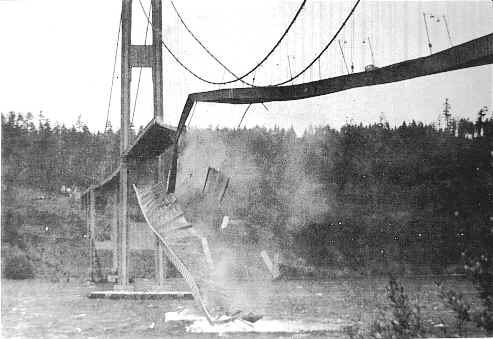
Tacoma Narrows Bridge

Tacoma Narrows Bridge. (Source)

If the above paragraph seems to convey unnecessary caution on the part of the engineer (why call the bridge unsafe if it isn’t breaking up?), consider that a bunch of reasons go into making such decisions. As an example, the engineers may consider their ability to detect every crack. The engineering team may consider the possibility that they could not detect some defects. What is the probability of a serious defect not being detected?

And there’s good reason to be cautious – if they get it wrong, bridges do collapse.

How do metallic materials fail?

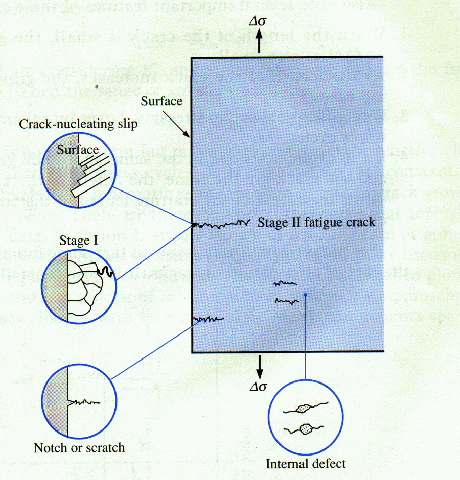
In the previous section, we have been talking about cracks. Here’s why they form in the first place. Cracks form when the load on a given region of a component (i.e. stress, = force per unit area) becomes higher than what the material can handle. This may be because an unexpected amount of load was put on the structure that it was never designed for. It may also be that the capacity of the structure to withstand stresses has diminished over time as the component has aged. In any case, when the stress is too much for the component to bear, the component fractures and develops a crack. The particular mechanics of the fracture itself is a vast area of study in itself, and is way beyond the scope of this piece. Suffice to say, that crack formation weakens the component, and the larger the crack gets, the worse in condition the component becomes. Ultimately, the crack will grow large enough that the component will break into two, and will be unable to take any load at all.

Crack propagation under fatigue loading

Crack propagation under certain conditions. (Source)

For metallic components, since the material itself is nominally homogenous (nominally, because nothing can be perfectly homogenous, but for all intents homogeneity may be assumed), the crack that ultimately causes the material to fail usually occurs where the stress happens to be the greatest. Further, as I mentioned above, the formation of a crack weakens the material, and so once a crack does form, any further worsening in that region accumulates around the same crack (weak zone) instead of creating new cracks all the time. “Where the stress is greatest” usually depends on the geometry of the component, on how the loads are distributed, and, indeed, on tiny variations in the homogeneity of the material itself.

Crack propagation in glass shot at extremely high frame rate. (Source)

For metals, therefore, the mantra for evaluating the component may be condensed as: “follow the cracks”. Wherever a crack seems to be worsening, is where final failure will most likely occur.

That’s it for today’s discussion on crack propagation; next time we’ll get to what I had actually set out to discuss – failure in composites.


Using MathJax with Octopress

Update in 2026: This method did not survive my move to Pelican. The necessary JS was not move over correctly, and, even more importantly, the MathJax framework this post uses (cdn.mathjax.org) was shut down several years ago. Instead, I’m trying out this jsDelivr alternative. I’m not changing this post overall, except to update the backend to the new system.

–

I’ve been meaning to try and implement MathJax on this website for a while now. For including math equations on a website, MathJax is probably one of the more elegant ways to do it. I can write equations in TeX format, and MathJax renders the equations properly for you!

Finally, in the last couple of days I’ve been forced to get around to it, thanks to a new post that I’m writing that includes a little bit of math. So anyway, I just wanted to jot down that process.

The thing with MathJax is that it’s meant to, and does, work with HTML. But since I’m working with Octopress and Markdown, I have to ensure that the conversion from Markdown to HTML produces no unwanted syntactical errors for MathJax. To get around this problem, Zac Harmany (I hope I got the name right) suggests tweaking the Markdown rendering engine to Pandoc, so that the conversion works as desired. I’m sure that works great, but I had no intention of tweaking my Markdown conversion engine. Instead, I discovered a nifty ruby bundle (here) that serves a great purpose.

Next, the typical MathJax “installation” involves adding a line in the <head> section of your Octopress theme (Add it to %octopress_root%/source/_includes/custom/head.html), so that when every page loads, the necessary Javascript files are also loaded, ready to render your equations. I did not want the Javascript to execute to load along with all my pages, given that I don’t expect to have equations in all my posts. Instead, I’ve included the call to the script in the <body> of the post, i.e. in the meat of the post itself. Remember that the declaration needs to be before your first equation.

I also contemplated downloading the MathJax distribution and hosting it locally on my own server, but that did not work at all. There are way too many files to be uploaded (each file is small; the total package is ~50MB; there are too many files, though) and it just took forever to upload to my server until I just gave up. I’ll revisit that option if I think using MathJax’s own servers is not working well—which I doubt will happen.

With those details, here’s how I set things up:

  • Install the verbatim.rb plugin from this Github repository. To do this, simply download the file (‘Gist’ in Github parlance) and place it in %octopress_root%/plugins. When inserting equations, there’s a syntax to using this plugin; I’ll demo it below.

  • Create a MathJaxLocal.js file at %octopress_root%/source/javascripts/ to add local configurations for MathJax. Note that the last line of the code must point to the full path of the local file, in my case http://arnabocean/javascripts/MathJaxLocal.js

    Here’s what my MathJaxLocal.js looks like (I started with Zac Harmany’s file and modified to suit my needs.):

    MathJax.Hub.Config({
        jax: ["input/TeX","output/HTML-CSS"],
        extensions: ["tex2jax.js","MathMenu.js","MathZoom.js"],
        tex2jax: 
            {
                inlineMath: [ ['$','$'], ['\\(','\\)'] ],
                displayMath: [ ['$$','$$'], ['\\[','\\]'] ],
                skipTags: ["script","noscript","style","textarea","pre","code"],
                processEscapes: true
            },
        TeX:
            { 
                equationNumbers: { autoNumber: "AMS" },
                TagSide: "left",
    
            },
        "HTML-CSS": { availableFonts: ["TeX"] }
        });
        MathJax.Ajax.loadComplete("http://arnabocean.com/javascripts/MathJaxLocal.js");
    
  • Declare the location of the MathJax files. The easiest thing to do is to use MathJax’s own servers. However, in addition to just their servers, you’ll have to link to your own local config file as well, so we’ll add both of these at the same time. In the main body of your markdown post (preferably after the “Read More” fold), add the following:

    <script type="text/javascript"
    src="http://cdn.mathjax.org/mathjax/latest/MathJax.js?config=TeX-AMS-MML_HTMLorMML,http://arnabocean.com/javascripts/MathJaxLocal.js">
    </script>
    

In the above, the first link points to MathJax servers, the second points to my own config file.

And that’s basically it! Now you’re all set to write beautiful equations. Here’s a demo:

<!-- MathJax configuration -->
<script type="text/javascript" src="http://cdn.mathjax.org/mathjax/latest/MathJax.js?config=TeX-AMS-MML_HTMLorMML,http://arnabocean.com/javascripts/MathJaxLocal.js">
</script>
<!-- End MathJax Configuration -->

{% raw %}{% verbatim tag:p %}{% endraw %}
\[ 
f(x)= a_0 + a_1\sin(x) + a_2\sin(2x) + ...
\]

\[  
+b_1\cos(x) + b_2\cos(2x) + ...
\]

\[
f(x)=a_0+\sum_{k=1}^\infty\big( a_k\cos(kx)+b_k\sin(kx) \big)
\]
{% raw %}{% endverbatim %}{% endraw %}

And here’s what that would look like:

\[ f(x)= a_0 + a_1\sin(x) + a_2\sin(2x) + … \] \[ +b_1\cos(x) + b_2\cos(2x) + … \] \[ f(x)=a_0+\sum_{k=1}^\infty\big( a_k\cos(kx)+b_k\sin(kx) \big) \]

There’s still a lot of more that I need to find out, and from the looks of it, Zac’s website is a great resource. I’ll add more posts if I find anything useful that I end up using.