➶ Of the original Prince of Persia video game (Youtube)

If you’re old enough to have played — or watched! — any version of the original Prince of Persia computer game, or, take an interest in design and/or programming, this Youtube video is for you. What a wonderfully charming retelling of how the game was developed, working within frugal memory limits of the Apple ][ for which it was originally developed.

And no, I’m not old enough either to have played the original on an Apple platform. My first sighting of this piece of art was in the late 1990s, on the computer of one of my dad’s friends. For me, these were the really early days, personal computers were starting to enter the mass market, and the teenage me was buckling in for the ride. If I remember correctly, I only played this game on Mridul kaka’s (translation: Mridul uncle’s) computer a couple of times, and I remember being completely awestruck by how fluid the character movements looked. This game was gorgeous. Those were the days when games were blocky at best, and Prince of Persia was just something else. As I said, a work of art.

And now I find out those fluid animations were based on real motion capture! In the 1980s! How unbelievably cool is that? Seriously, go watch, you won’t regret it.

∞
➶ Bertrand Serlet — ‘Why AI works’

If you take an interest in why — not how — the modern large language models work, this is a great 30-minute video lecture from Bertrand Serlet, former Senior Vice President of Software Engineering at Apple. This is a well-crafted, non-jargon talk to take in; at the very least, it’s a lesson in how to communicate a complex, mathematical topic in incremental, bite-size pieces without devolving into multi-layer flowcharts and equations.

I started watching because I remember Serlet from a couple of his hilarious presentations from his Apple days (watch here, then here) poking fun at Microsoft, and I’m glad I didn’t skip this one.

If, after watching the video, you would like to follow up on the topic with some technical reading, I have you covered. Transformers are a type of deep neural network, specifically trained to make predictions based on chains of previous input, using the inherent contexts and relationships therein.

So, while an image classifier takes in a single image and predicts probabilities that the image contains specific objects, a transformer takes in a sequence of information pieces, chained together, and makes a contextual prediction. The prediction in this case tries to extend the input chain, which can be the next logical word, next logical pixel, next logical musical note, etc.

If you want to take a deep dive into building a simple LLM from scratch, you may start with Andrej Karpathy’s tutorial. Karpathy is one of the co-founders of OpenAI (makers of ChatGPT), and this is a very well put-together lecture. He also has an hour-long “busy-person’s intro to LLMs”.

Finally, if you really want to go into the rabbit-hole, this paper is what started the transformer revolution: Attention is all you need. The View PDF link will take you to the PDF version of the paper. This LitMaps link will show you how influencial that paper has been.

But, seriously, forget all of the technical stuff. Go watch Bertrand’s video lecture.

P.S.: I should note, this is not an unconditional endorsement of AI in general and LLMs in particular. These technologies are being used, and may continue to be used, in ways that are unsavory, short-sighted and dangerous. We need to be circumspect and judicious in how we deploy these extremely powerful technologies, so that we don’t incur unacceptable costs in the long term. We should aim to bolster our creative crafts with AI, not foolishly attempt to replace human creativity.

∞

Apple’s Curse

Last Fall, Apple included a fingerprint sensor in its latest iPhone, and called the technology ‘TouchID’. A few days ago, Samsung did the same, including its own fingerprint sensing technology in its latest Galaxy S5 phone.

The blogosphere has been aflutter about one small difference between the two launches: when Apple launched their technology, there was a huge uproar about the implications of using fingerprints as an authentication tool. As everyone has been pointing out, even a US Senator, Al Franken, issued a public email (PDF) addressed to Apple asking for clarifications and explanations regarding the technology and its implications. In contrast, Samsung’s new technology has received no such attention.

Apple: Think Different

Apple: Think Different.

Here are my two cents on the reasons:

First, Samsung’s technology has followed Apple’s by almost half a year. In this time, users have had the chance to use the technology first hand, and have realized that the world has not, in fact, turned on its head. Thus, a similar technology from Samsung, even though its implementation is way more far reaching, has not brought any new questions or paranoia.

Second, and more importantly, Apple is a modern cultural and technological icon. There’s no way around it—anything that Apple does is subject to way more scrutiny than any of its competitors. And this is because—even if subconsciously—we have come to expect greatness, caution and prudence from this company and its products. Hence, for example, the attention to Apple’s Chinese production lines, even though every other technology company uses the same companies, and the attention to Apple’s tax schemes, even though every other company does the same—perfectly legal—thing.

This is how it should be.

Apple has shown itself to be the leader of the pack, the pioneer of modern technology; the company to follow, imitate and plagiarize from. Apple has similarly shown leadership and candor in other matters: when scrutinized about their tax practices, they actually suggested tax reforms; when a bill to solidify employee non-discrimination was on the table, Apple endorsed it, and their CEO Tim Cook personally talked about it. And, oh, even without a law being present, Apple of course already had in-house rules of similar effect, as a matter of principle; it simply would not do for it to be otherwise.

With great power, as they say, comes great responsibility, and this extra scrutiny, the extra attenion and paranoia, is the flip side to their influence and strength—their curse along with their blessing, if you will.

May Apple carry this curse with pride and with distinction, for times to come.


My scientific writing workflow

I am not fond of MS-Word. Correction: I cannot really tolerate MS-Word, and the only times I really use it are for work, where documents must be shared, modified, commented upon, and tracked for changes between multiple authors, contributors and edit cycles. For those particular circumstances there really isn’t another viable alternative to MS-Word, is there.

But of course, the criteria for my own scientific writing are very different. The only sharing and discussion is with my dissertation adviser, and I can easily handle one other contributor without needing MS-Word. So, of course, I’ve moved as far away from that bloated, cranky piece of software as I can—which is to say, completely away.

Instead, here’s what I use.

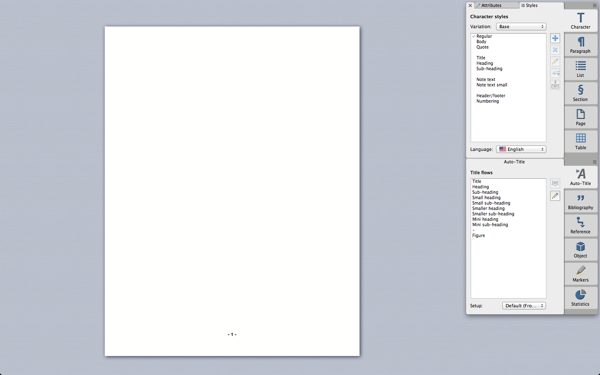
My word processor of choice on the Mac is Mellel. It’s beautiful, runs smoothly, and is a joy to use. Its listed feature set is vastly inferior to that of Word, but the features it does carry are executed extremely well. After all, what use are a plethora of features that really make the program bloated and difficult to use? (Please, go read that article; it’s cathartic for frustrated Word-users.) Plus, these features are more than sufficient to meet my needs (and, I think, that of most other scientic writers). I have not felt the need—yet—to incorporate the math rendering excellence of LaTeX, and for all other purposes, Mellel works great.

Mellel in Full-screen mode

Mellel in Full-screen mode.

But here’s the thing. I don’t like writing in word processors. Even in great ones such as Mellel, you’re distracted every once in a while by the formatting, and how the headings are looking, and whether a paragraph should flow on to the next page, and so on. Plus, I’ve developed a universal distaste for proprietary document formats, and this extends as much to Mellel’s proprietary format as to Word’s. I’d like to read and make sense of my documents irrespective of which software I happen to have available for use.

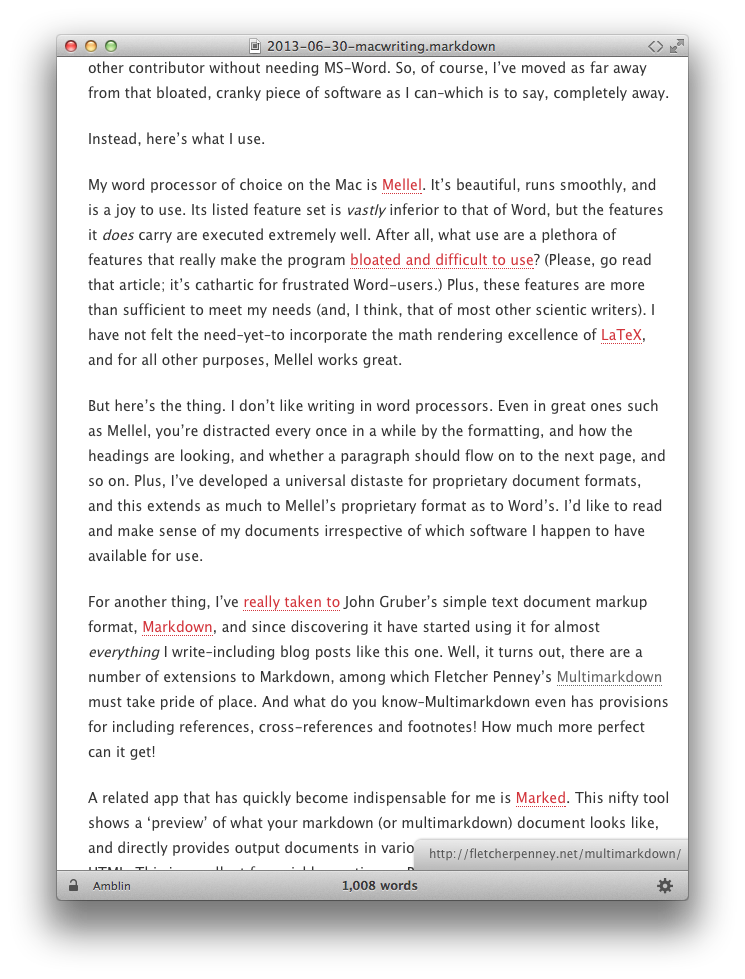
For another thing, I’ve really taken to John Gruber’s simple text document markup format, Markdown, and since discovering it have started using it for almost everything I write—including blog posts like this one. Well, it turns out, there are a number of extensions to Markdown, among which Fletcher Penney’s Multimarkdown must take pride of place. And what do you know—Multimarkdown even has provisions for including references, cross-references and footnotes! How much more perfect can it get!

A related app that has quickly become indispensable for me is Marked. This nifty tool shows a ‘preview’ of what your markdown (or multimarkdown) document looks like, and directly provides output documents in various formats, including PDF, RTF and HTML. This is excellent for quickly creating an RTF document to send to my adviser for review.

Marked preview of this blog post

Marked preview of this blog post.

If you’ve been keeping count, the only piece of software necessary for scientific writing that I haven’t mentioned is a citation/bibliography tool. Endnote is a popular choice for many, and I’m sure it’s pretty good, but there’s a couple other excellent Mac apps for this–Bookends and Sente. Based on online reviews and forums, I ended up selecting Bookends a few years ago, and I haven’t regretted the decision. As a bonus, Bookends integrates perfectly with Mellel, making life very easy indeed. (I noticed while writing this post that Sente’s pricing terms seem to have changed quite a bit since I was researching it, and for all I’d heard, Sente is excellent too.)

There’s another Mac writing tool that’s great for writing long documents, especially where the document is divided into chapters and sections. This is Scrivener. Plus, the basic document format for Scrivener is plain text, which straightaway satisfies my wariness for proprietary formats. Scrivener is also excellent, and would have suited my type of scientific writing perfectly, except for one solitary reason. It doesn’t play well with Bookends. To use Bookends, you have to export your document to an RTF file, and then use Bookends. This means you’re once again left with an extra step of having to include formatting. Not good for me, and Mellel wins. (Scrivener, on the other hand, is the only app in my list that is also available for Windows. If you’re a Windows user, this is an excellent app that you should certainly explore.)

So now that we’ve identified the pieces of software that I use, here’s my workflow.

  • Choose any text-editor (Sublime Text, BBEdit, Text Wrangler, or even the ever worthy, simple TextEdit), and write the actual text in Multimarkdown format. Include citations as required; for the ‘citation’ portion, use any label of your choice, and for the ‘link’ portion, include the identifier string from Bookends that you must use to finally automatically create the bibliography. This way, when I use Marked to export to RTF, my citations are already automatically shown as citations, even though I haven’t done anything with Bookends yet. The bibliography section at the end looks funky, but that’s not a problem with documents in progress.
  • When ready, export the document as RTF, and copy-paste the entire contents into a new Mellel document.
  • For each citation, replace the custom label I had chosen with the Bookends identifier. This is a simple matter of doing a ‘Find-Replace-All’ for each citation.
  • Use Bookends to add the bibliography!

Here are the advantages to this scheme:

  • No use of MS-Word, but you’re able to export to RTF or .doc format, if needed, from Mellel.
  • You’re always able to deal with plain text for all your documents, up until the very last stage where page-setting must come into the picture.
  • Even for a document in progress, it takes only a moment to create a perfectly readable document, via Multimarkdown, that includes inline citations instead of the ugly Bookends identifier.

If you don’t care about using plain text formats, or are simply not comfortable or don’t want to get used to Markdown, just replace MS-Word with Mellel. You can still do all your document writing in a word processor, just like in Word, and you’ll quickly find that it’s way more efficient to use Mellel. You’ll love it—guaranteed.


➶ Steve Jobs is dead.

Steve Jobs passed away today. 😔

I’ve only seen him as a public figure, of course, but I was, and will remain, a fan. I’ve admired him greatly, not just for the company he built, but for how he conducted his business—well, for the things he said and did publicly, at any rate.

A straightforward, honest man who played extremely hard when running his company, but who made sure he did the right thing all the same.

For an inkling to his way of thinking, see his Stanford commencement speech, and the interview he gave at the D8 conference.

Rest in Peace, Sir. Your legacy will live on, and will hopefully inspire the next generation of visionaries.

–

Cross-posted at GLobeTrekker

∞